Search My Blog

Thursday, September 29, 2016

PowerBuilder TV - PowerGen 2016

Tuesday, October 11, 2016
at 8:00 AM PST (Los Angeles) / 17H00 PM CET (Paris).

Automating the PowerBuilder Build Process with PowerGen 2016


    An essential tool to automate the building of PowerBuilder applications, it lets you use command line functions to automate the entire build, create libraries from object source. With PowerGen, you can control your builds with predictability and reliability.

Presenter: Phil Wallingford


Image result for register button    Image result for learn more button


Regards ... Chris

PowerBuilder TV - BootStrap for PowerBuilder!

Tuesday, October 4, 2016
at 8:00 AM PDT (Los Angeles) / 17H00 CEST (Paris)

Bootstrap for PowerBuilder

PowerBuilder Bootstrap - Enterprise Edition                                                      
   Download the source files of a PBT from your source control system and import the objects into empty PowerBuilder library files that it creates for you. Follow that up with any rebuilds and regenerates that are needed to get all objects to compile successfully.
With PowerBuilder Bootstrap, you will be able to:
  • Extract all source code files for a target from a source control system.
  • Create new library files for a target and import all the object source code files.
  • Generate a new PBC file for a Workspace.
  • Optimize all libraries for a target.
  • Compile the executable files for a target and copy to a deployment folder.
Presenter: Roland Smith


Image result for register button    Image result for learn more button


Regards ... Chris

Friday, September 2, 2016

Appeon Mobile - Split Screen

** Hot News **


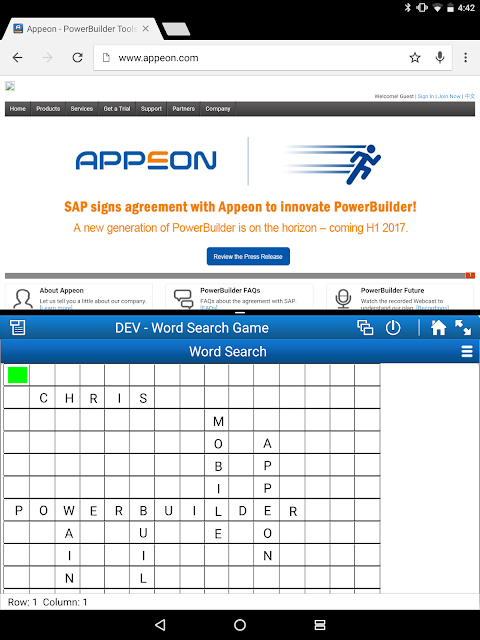
   While testing the new Appeon 2016 product's Appeon Work Space (AWS) installation on my mobile devices, I was also able to these this the new Android O/S release 7.0. There is an interesting feature of the new Droid 7.0 O/S known as the Split View (Screen) feature. This means that you can have two mobile applications displayed and interact with them simultaneously. To my delight, the new Appeon 2016 AWS worked the first time I tested this new Android feature!


  Using the new Split View mode is a little non-intuitive though. So here are the steps you need to use:

1) Open up any Android application - like the Web Browser for example.
2) Press and hold the Recent Apps (minimize) button for at least 2-3 seconds.
3) A split request dialog will appear.
4) Now press (tap) the Home button.
5) Launch AWS (or any other application) and start a mobile PB application.
6) Now ... Enjoy split mode!

Example of Browser & AWS running a mobile PB application in split mode ...


  (Actual PB 12.6 mobile application on my Nexus 9 tablet in Split mode)

Note: Once in split mode, you can swap out any number of applications in the split area.

Regards ... Chris