Search My Blog

Thursday, February 22, 2024

PSR Report Viewer (2024 R1) Released!

 ** Hot News **

PSR Viewer Application updated for PB 2022 R3!


    Software Tool & Die Inc. are please to announce a new version of the PowerSoft Report (PSR) Viewer (v2024.1.0.35) application built from the latest free open source STD Integrated Foundation Classes and specially designed for Appeon PowerBuilder version PB2023 R3 build 3289! The Foundation Classes provide most of the PSR functionality natively by having this application wrapped around the framework's DataWindow Control ancestor class! The PSR Viewer allows the user to view DataWindow reports that have been saved in PB's proprietary PSR format from either Appeon PowerBuilder or InfoMaker products. A PSR file is actually the DataWindow Object source along with its Primary data buffer contents.
 

PSR App example showing Zooming, Rulers & Print Preview


   Included in this new release are also the ability to write to the MS-Windows 10/11  "Notification area" and also drag & drop external PSR files into the PSR Viewer for display. A much more intuitive  way of working!

MS-Windows 10 Notification
Drag & Drop external PSR report files directly into the PSRViewer!  

 
Supports new PB 2022 R3 themes...

PSR Viewer using the new Orange Theme from PB 2022 R3 release!

 
   The new PSRViewer.exe application is built using the latest version of the STD Integrated Foundation Class library (2024.2.0.380) utilizing PowerBuilder 2023 R3's build 3289 feature set). The revised PSRViewer has also been extensively tested on the newer W11 Operating System as well with no issues. The new PSRViewer now also includes a new PowerClient project object for App deployment via that mechanism as well as compiled EXE. The application can also be run in either M-Code, P-Code compilations and in either 32 or 64 bit mode also.
 
   The updated PSR Viewer application for Appeon PB2023 R3 can be downloaded from the SourceForge web site ... just click here! For older PB versions of the PSR viewer you can download them from here.


Enjoy ... Chris

Tuesday, February 13, 2024

STD Integrated Framework (2024 R1) released!

 ** Hot News **

  Integrated Foundation Classes (2024R1) Released!

 "THE" Framework for PowerBuilder & PowerServer 2022 R3!

(Framework version 2024.1.0.374 - February 09, 2024)  


        Software Tool & Die Inc (STD) are very pleased to announce that they have just released a new version of their Integrated Foundation Class library framework 2024 R1 (build 2024.1.0.374) exclusively for PowerBuilder 2022 R3 and PowerServer 2022 R3 (Cloud), and InfoMaker 2022 R3 (build 3289) - with many new features, enhancements and upgrades!
  
     STD are also very excited as this release represents another significant enhancement milestone to the Integrated framework that really further exemplifies the power of the Appeon PowerBuilder 2022 R3  development environment! The updated framework combined with the current PowerBuilder and/or PowerServer products, positions developers to take advantage of today's Agile and DevOps methodologies. Plus it further enhances a newer GUI "punch" in your Native and Cloud based Apps without buying expensive add-on products. Especially, since the framework is free!

     For a summary of the previous framework version's new & revised features for 2023 through 2024, please follow these links - 20231R12023R2 and 2023R3 (was only in beta - never released as GA). Note that the Integrated framework had 3 releases in 2023 so that it's always leading edge and feature rich! STD also has more features planned for more Integrated framework in 2024 as well!
   
   The following are some of the key highlights of the new 2024 R1 Integrated Foundation Class library for Appeon PowerBuilder 2022 R3 build 3289, as follows:
 
Debug the WebView2 engine used by the Web Browser control:
 
Add these settings to your App's INI file


Any App that uses Web Browser control (ie: OrderEntry Demo App)

Run any Web Browser using URL: (ie:  http://localhost:6124/json/list)

Tip: This feature also allows you to now debug and drive "use test cases" using the AscentialTest testing software from Zeenyx.


Grid DataWindow Line Colour:
 
New DWC Property
 
Grid Line Colour setting example based on new property!

New Themes Colour Support:

Support for new Themes in PB 2022 R3

Example of the new Lime Green theme in use!

Resources Monitoring:
 
Memory / GDI - alerts App user when in Debug Mode!


 Mouse Cursor on All Controls:
 
New Cursor Property
 
Mouse Cursor example
 
Updated MS-Word Spell Checking:
 
Now detects no errors and no text to spell check!
 
 
New ADMIN App example:
 
Updated for PB 2022 R3 & latest framework release!
 
PowerServer failover:
 
New INI settings

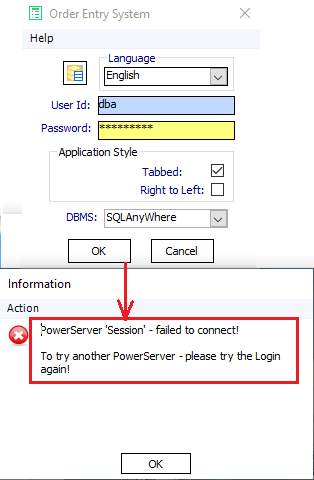
Framework detects PS connection failure!

Framework logs PS connection activity
 
 
  Tabbed View opening direction example:
 
Tabbed View open Left or Right toggle example!
 
Enhanced Log Viewer access:
 
Log Viewer now accessible from any Window type (when in Debug mode)!
  

     The latest Integrated framework version contains the following updates and has been tested with the latest MS-Windows 10 O/S (22H2 build 19045.3996, MS-Windows 11 O/S (23H2 build 22631.3085), PB 2022 R3 build 3289 and the PowerServer 2022 R3 build 2.1.0. Testing within PB Apps included Win32 (both P-code & M-code) and Win64 (P-code) executable deployments. Testing inside of PowerClient and PowerServer included both 32bit and 64bit Apps & PowerServer App/Server (Web API) deployments.

Note: All the STD framework versions are free and can be downloaded from its STD Foundation Classes project hosted on the SourceForge website. The frameworks, Demo Apps, etc  are licensed under Apache 2.0 open source model.

Release 2024.1.0.374 - Major Release (2024R1) - change highlights ...   
  • Migrated the framework from version 2023.2.0.355 to 2024.1.0.374 under PB 2022 R3
  • Modified nc_app_controller_master to remove Web App check as product is now deprecated.
  • Modified nc_app_controller_master to return Primary & secondary "fail-over" URLs
  • Modified nc_app_controller_master to remove all DBMS variables as they are now handled by Transaction object.
  • Modified nc_app_controller_master to remove all Dockable variables as this feature is now deprecated.
  • Modified nc_app_controller_master "of_restart_application" to remove Dockable code as this feature is now deprecated.
  • Modified nc_app_powershell_master to use the LongPTR datatype for Window pointers
  • Modified nc_app_powershell_master to Add the "of_run_as_admin" method
  • Modified nc_system_tray_master "of_load_image" to revise the extraction SDK calls
  • Modified nc_system_tray_master "of_load_image" to clean up code.
  • Modified ns_sqlca_master "of_connect" to handle PowerServer session err0r.
  • Modified vc_tp_about_master to remove path from EXE full names
  • Removed all global functions for Dockable Window support as it's deprecated.
  • Modified vs_cb_master to add Mouse Cursor property & support.
  • Modified vs_chbx_master to add Mouse Cursor property & support.
  • Modified vs_dc_master to add Mouse Cursor property & support.
  • Modified vs_dc_master to add Mouse Cursor property & support.
  • Modified vs_ddlb_master to add Mouse Cursor property & support.
  • Modified vs_ddplb_master to add Mouse Cursor property & support.
  • Modified vs_dp_master to add Mouse Cursor property & support.
  • Modified vs_em_master to add Mouse Cursor property & support.
  • Modified vs_gb_master to add Mouse Cursor property & support.
  • Modified vs_gr_master to add Mouse Cursor property & support.
  • Modified vs_hpb_master to add Mouse Cursor property & support.
  • Modified vs_hsb_master to add Mouse Cursor property & support.
  • Modified vs_htb_master to add Mouse Cursor property & support.
  • Modified vs_inkedit_master to add Mouse Cursor property & support.
  • Modified vs_ip_master to add Mouse Cursor property & support.
  • Modified vs_lb_master to add Mouse Cursor property & support.
  • Modified vs_lv_master to add Mouse Cursor property & support.
  • Modified vs_mc_master to add Mouse Cursor property & support.
  • Modified vs_lv_master to add Mouse Cursor property & support.
  • Modified vs_mle_master to add Mouse Cursor property & support.
  • Modified vs_ole_master to add Mouse Cursor property & support.
  • Modified vs_pb_master to add Mouse Cursor property & support.
  • Modified vs_pc_master to add Mouse Cursor property & support.
  • Modified vs_phl_master to add Mouse Cursor property & support.
  • Modified vs_plb_master to add Mouse Cursor property & support.
  • Modified vs_phl_master to add Mouse Cursor property & support.
  • Modified vs_rb_master to add Mouse Cursor property & support.
  • Modified vs_sle_master to add Mouse Cursor property & support.
  • Modified vs_st_master to add Mouse Cursor property & support.
  • Modified vs_sthl_master to add Mouse Cursor property & support.
  • Modified vs_tc_master to add Mouse Cursor property & support.
  • Modified vs_tc_master to revise TP header height adjustment.
  • Modified vs_tc_master "oe_resize" to revise code to TabbedView feature.
  • Modified vs_tc_master to add Mouse Cursor property & support.
  • Modified vs_tc_master to remove native PB check.
  • Modified vs_tc_master to remove old Theme height / width adjustment
  • Modified vs_tv_master to add Mouse Cursor property & support.
  • Modified vs_vpb_master to add Mouse Cursor property & support.
  • Modified vs_vsb_master to add Mouse Cursor property & support.
  • Modified vs_vtb_master to add Mouse Cursor property & support.
  • Modified wn_controller_master to remove Dockable support as this feature is deprecated.
  • Modified wn_log_view_master to remove Dockable support as this feature is deprecated.
  • Modified wn_logon_master to remove Dockable support as this feature is deprecated.
  • Modified wn_main_master to remove Dockable support as this feature is deprecated.
  • Modified wn_ds_master to add support for printer tracing
  • Modified wn_dc_master to handle spell checking status better
  • Modified wn_em_master to handle spell checking status better
  • Modified wn_mle_master to handle spell checking status better
  • Modified wn_rte_master to handle spell checking status better
  • Modified wn_sle_master to handle spell checking status better
  • Modified wn_master to support "NewTabRightMost" porperty & feature
  • Modified wn_controller_master to adjust for the PB2022 R3 TabbedView feature
  • Modified wn_master to log activation in debug mode
  • Modified nc_controller_master to add "of_check_cloud_version" method & supportive code
  • Modified nc_ds_master to add "of_get_child" method for supporting various DWO types
  • Modified nc_dc_list_master to add "of_set_line_colour" method & supportive property
  • Modified nc_dc_master to add "of_get_child" method for supporting various DWO types

       The OrderEntry example application and the Integrated Framework's Documentation has also been updated to the new Integrated Foundation class 2023R2 framework version. You can download the example application from here. Also, check out the online "getting started" video series to accelerate your assimilation of the best & free framework for PowerBuilder, PowerClient & PowerServer (Cloud) based applications! 


Special thank you...

 
Visual Expert's STD Framework Summary Analysis


   STD would also like to thank Novalys Corporation for their support of the Foundation Classes by supplying the VisualExpert product for the framework's analysis & documentation!
 
 
 Enjoy!

Tuesday, October 3, 2023

STD Integrated Framework (2023 R2) released!

  ** Hot News **

  Integrated Foundation Classes (2023R2) Released!

 "THE" Framework for PowerBuilder & PowerServer 2022 R2!

(Framework version 2023.2.0.355 - September 26, 2023)  
 
New Framework Encryption features!


        Software Tool & Die Inc (STD) are very pleased to announce that they have just released a new version of their Integrated Foundation Class library framework 2023R2 (build 2023.2.0.355) exclusively for PowerBuilder 2022 R2 and PowerServer 2022 R2 (Cloud), and InfoMaker 2022 R2 (build 2819) - with many new features, enhancements and upgrades!
  
     STD are also very excited as this release represents another significant enhancement milestone to the Integrated framework that really further exemplifies the power of the Appeon PowerBuilder 2022  development environment! The updated framework combined with the current PowerBuilder and/or PowerServer products, positions developers to take advantage of today's Agile and DevOps methodologies. Plus it further enhances a newer GUI "punch" in your Native and Cloud based Apps without buying expensive add-on products. Especially, since the framework is free!

     For a summary of the previous framework version's new & revised features for 2021 through 2022, please follow these links - 2021R5, 2022R1  and 2022R2. Note that the Integrated framework had 3 releases in 2022 and 5 releases in 2021 - so that it's always leading edge feature rich! STD also has more features planned for more Integrated framework in 2023 as well!
   
   The following are some of the key highlights of the new 2023R1 Integrated Foundation Class library for Appeon PowerBuilder 2022 R2 build 2819, as follows:
  • All obsolete object system classes were removed to align with PB2022 R2
  • Refactored some external API's to conform to PB 2022 R2's use of the C++ v2022 compiler!
  • Tested code compliance with W10 / W11 & W2019 / W2022 22H2 builds.
  • Now encrypts all Transaction object settings for better App security
  • Transaction encryption now uses random / unique encryption key per instance.
  • Now encrypts PowerServer connection & DBParm settings for better N-Tier security
  • All DBMS INI connection settings are encrypted better App security
  • Created a new ADMIN App to handle INI encryption. 
  • Refactored the ns_sqla_master Ancestor object class to handle all DBMS connectivity
  • Added new object classes to support the new PDF Builder feature
  • Revised the ns_app_controller_master class to handle DPI awareness
  • Revised the ns_app_controller_master class to allow each App to have their own encryption key.
  • Revised the ns_app_controller_master class to fix MS-Word Spell Checking in Office 365
  • Revised the OrderEntry Demo App to connect to either SQL Anywhere, SQL Server or PostGres PB2022R2 "Demo DB"!
  • Added TabbedView support to the MDI Window ancestor class!

INI Encryption Example:
 
 ; SQLAnyWhere (Version 17)
[Database Information SA1]
; The following DB is used for 32bit PB Apps (and PB IDE)!
Database32=£–dŠ×ÎÜ…»±’Á…ƒ……¥…
; The following DB is used for 64 bit PB Apps!
Database64=£–dŠ×ÎÜ…»±’Á…ƒ……¥…
; DB = Dbms version Check ( Y / N )
DB_Check_Version=¬
DB_Expected_Version=„‹rv ’ž“®Ÿ§£
DBMS=¢˜†
UserID=·¶¥
LogId=·¶¥
LogPass=ÆÅ°
Lock=¥¦
ServerName=ŸÃ§§Þ©ÜØë
AutoCommit=Y
DBParm=–ò´×Äá¸ëáÛÙºz—¦¡£•s—¸ÀÂs—•s©…ƒ……¥…
CacheName=¦•£Š×ÎÜ©¹
 
Transaction Object Encryption example:
 
 
MS-Word Spell Checking example:


New ADMIN App example:


PB 2022R2 Demo Database downloads:
 
 FYI: https://github.com/Appeon/PowerBuilder-Project-Example-Database

Demo App Multiple DB Support example:


 Demo App Tabbed View example:


     The latest Integrated framework version contains the following updates and has been tested with the latest MS-Windows 10 O/S (22H2 build 19045.3516, MS-Windows 11 O/S (22H2 build 22621.2361), PB 2022 R2 build 2819 and the PowerServer 2022 R2 build 2.1.0. Testing within PB Apps included Win32 (both P-code & M-code) and Win64 (P-code) executable deployments. Testing inside of PowerClient and PowerServer included both 32bit and 64bit Apps & PowerServer App/Server (Web API) deployments.

Note: All the STD framework versions are free and can be downloaded from its STD Foundation Classes project hosted on the SourceForge website. The frameworks, Demo Apps, etc  are licensed under Apache 2.0 open source model.

Release 2023.2.0.3255 - Major Release (2023R2) - change highlights ...   
 
  • Migrated the framework from version 2023.1.0.325 to 2023.2.0.355 under PB 2022 R2
  • Continued to refactor API's to conform to the new C++ v2022 compiler used in PB 2022 R2 (IDE & Runtime)
  • Modified ns_sqlca_master to add "CacheName" to the of_encrypt & of_decrypt methods.
  • Modified ns_sqlca_master to add the of_load_connection_info method.
  • Modified ns_sqlca_master the of_postconstuctor to decrypt the User_ID value
  • Modified ns_app_controller_master to Moved PS Server check to Transaction Object on "of_connect" (ns_sqlca_master).
  • Modified ns_sqlca_master to perform a PS Check on a valid OS connection
  • Modified ns_sqlca_master to of_check_ps_version method to be public so that other objects can call it
  • Modified fn_spell_check method to handle MS-Office 365 speller
  • Modified ns_app_controller_master to add of_get_speller() and of_set_speller() methods
  • Modified ns_app_controller_master Destructor event to clean-up MS-Word OLE spell checker
  • Modified ns_app_controller_master Constructor event to handle setting DPI Awareness
  • Modified ns_sqlca_master to grab the PowerServer URL from the App's INI
  • Modified vs_dc_master to add of_set_save_required method
  • Modified the fn_web_browser_control_settings class to support the new WebView2 web browser engine
  • Modified the fn_web_browser_control_settings class to move the is_db_expected_version variable to ns_SQLCA_master
  • Modified ns_app_controller_master to add of_get_crypto_key method
  • Modified ns_sqlca_master to add is_dbms_expected_version variable now SQLCA's of_connect method
  • Modified ns_sqlca_master's of_check_version method to find the DBMS version within the Server's signature
  • Modified ns_sqlca_master class to add better PowerServer property settings
  • Modified ns_sqlca_master's of_load_connection_info method to use encrypted data from the INI file
  • Created a new PB App (STD_FC_Admin) that manages (Encrypt or Decrypt) database connection values in an INI file.

      The OrderEntry example application and the Integrated Framework's Documentation has also been updated to the new Integrated Foundation class 2023R2 framework version. You can download the example application from here. Also, check out the online "getting started" video series to accelerate your assimilation of the best & free framework for PowerBuilder, PowerClient & PowerServer (Cloud) based applications!
 
Visual Expert's STD Framework Summary Analysis


   STD would also like to thank Novalys Corporation for their support of the Foundation Classes by supplying the VisualExpert product for the framework's analysis & documentation!
 
 
 Enjoy!